REST API
Full control. Catalogue, quotes, orders and order status as simple JSON calls, with scoped keys.
- Bearer-token keys with four scopes
- Idempotent orders on your own reference
- Poll for delivery: QR code or number and code
Products
Data for 190+ countries and numbers for calls and codes, in one app.
Grow
Install a plugin, connect your Naara ID, and let the automation do the selling.
Get the app
One account everywhere. Pick your device and install in a minute.
Developers
Signed requests, live pricing and a sandbox to test every flow.
Company
Built in Africa for people who cross borders.
Naara for developers
eSIM data for 190+ countries and verification numbers, on one prepaid balance. Use the REST API, paste a widget on any page, or install the WordPress plugin. You keep your margin; we handle delivery.
Start with code, or start with a snippet. Every route uses the same safe checkout and the same prepaid money rules.
Full control. Catalogue, quotes, orders and order status as simple JSON calls, with scoped keys.
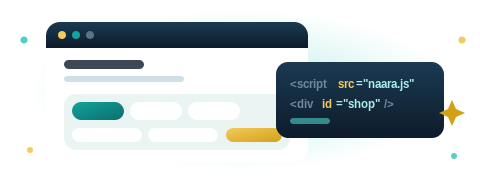
No server code. Paste two lines and your site sells eSIMs, numbers and gift cards on a Naara-hosted checkout.
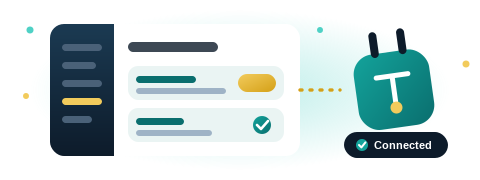
Upload, activate, place a block. Comes pre-filled with your key and tests its own connection.
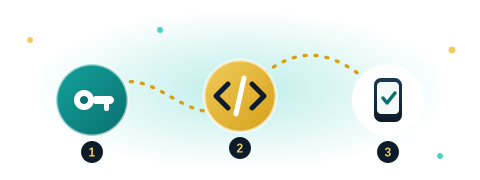
Quick start
List plans
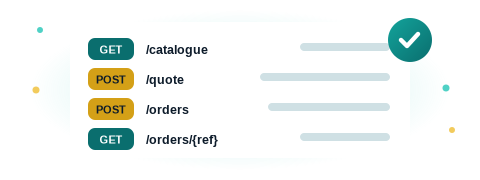
GET /catalogue returns what you can sell, with your price on every plan.
Quote the price
POST /quote confirms the exact amount before you spend anything.
Place the order
POST /orders with a unique reference. Hand the QR code to your customer.
Confirm delivery
GET /orders/{reference} until the status is completed.
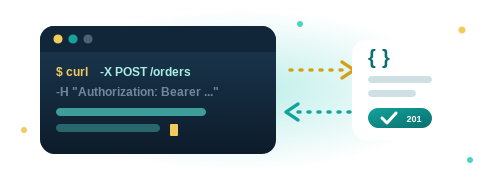
curl -X POST https://naara.app/api/v1/orders \
  -H "Authorization: Bearer $NAARA_KEY" \
  -H "Content-Type: application/json" \
  -d '{"type":"esim","plan_id":12,"reference":"order-1042"}'
<?php
require 'vendor/autoload.php';
$client = new GuzzleHttp\Client(['base_uri' => 'https://naara.app/api/v1/']);
$response = $client->post('orders', [
'headers' => ['Authorization' => 'Bearer ' . getenv('NAARA_KEY')],
'json' => ['type' => 'esim', 'plan_id' => 12, 'reference' => 'order-1042'],
]);
echo $response->getBody();const res = await fetch("https://naara.app/api/v1/orders", {
method: "POST",
headers: {
Authorization: `Bearer ${process.env.NAARA_KEY}`,
"Content-Type": "application/json",
},
body: JSON.stringify({ type: "esim", plan_id: 12, reference: "order-1042" }),
});
console.log(await res.json());import os
import requests
res = requests.post(
"https://naara.app/api/v1/orders",
headers={"Authorization": f"Bearer {os.environ['NAARA_KEY']}"},
json={"type": "esim", "plan_id": 12, "reference": "order-1042"},
)
print(res.json()){
"reference": "order-1042",
"kind": "esim",
"status": "processing",
"price_usd": 11.0,
"currency": "USD",
"result": {
"iccid": "8944...",
"qr_code": "https://.../qr.png",
"lpa": "LPA:1$rsp.example.com$ACTIVATION-CODE"
}
}What you get
Keys, balance and orders in one place. Create a key, choose its scopes, top up your prepaid balance and watch each order move from processing to completed.
A shop in two lines. The widget shows tabs for eSIMs, numbers and gift cards on your own site.
Every widget key has its own analytics: views, checkouts opened, orders and conversion, a daily chart, a funnel that shows where shoppers drop off, what sold, and the margin you earned. Compare any week, month or quarter with the one before it.
How widgets work
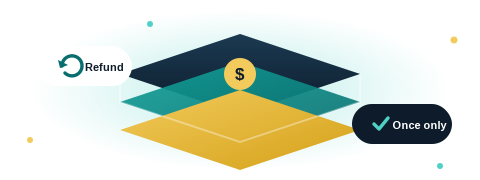
If a provider or a save fails, your balance is refunded automatically.
Orders are idempotent on your reference: the same request returns the same order.

You see your developer price. Provider cost is never in a response.

Give each key only the scopes it needs, and suspend it in one click.
Grouped the way you look for things: get started, learn the concepts, then go to the exact endpoint.
Create an account, make a key, top up a small balance and send three calls. Questions go to our support team.
 Naara Pro & Business
Broadcast Messages Done Right: Consent, STOP and What Channels Allow
A broadcast can build loyalty or burn your reputation. Here is how Respond handles consent, opt-outs and the rules that differ between channels. Oct 16, 2026
 Money, Wallet & Pricing
Wallet Top-Ups and Gift Cards on Naara: Paying, Withdrawing and Staying in Control
One wallet pays for everything. Here is how to top up, which payment methods you can expect, how to withdraw earnings and how gift cards fit in. Oct 15, 2026
 Naara Chat & Community
Naara Chat Tips: Gestures, Status Updates and Other Things You Might Have Missed
A quick tour of the small features that make Naara Chat faster: swipe to reply, status updates with mentions, scheduled messages and more. Oct 14, 2026
 NaaraCredits & Loyalty
Earn NaaraCredits by Following Brands: How the Rewards Hunt Works
Follow a brand's real social pages, earn credits you can spend on chat and calls, and know exactly how it is checked. Oct 13, 2026
 Naara Chat & Community
Voice and Video Calls on Naara: What Makes a Call Connect (and Why TURN Matters)
Calls inside Naara are peer to peer when they can be and relayed when they must be. Here is what that means for call quality and what to check if a call will not connect. Oct 12, 2026
 Developers & Integrations
Build on Naara: API Keys, Signed Webhooks and Testing Safely
How to connect your own tools to Naara: create a key, call the API, receive signed webhooks and verify them properly. Oct 11, 2026
 Developers & Integrations
Sell eSIMs on Your Own Website With Naara Widgets and the WordPress Plugin
Embed a Naara catalogue on your site, let visitors check out on a hosted page, and track every order, with or without writing code. Oct 10, 2026
 Naara Pro & Business
Launch Your Own Connectivity Brand: How Naara White Label Works
White Label lets an agency or entrepreneur run the Naara platform under its own name. Here is the path from landing page to your own live install. Oct 9, 2026
 Travel Handbooks
The Naara Travel Handbook Store: Long-Form Guides for People Who Move Across Borders
Short blog posts cannot cover a visa, a degree or a first lease. The Handbook Store has book-length guides, with a reader that can read aloud. Oct 8, 2026