


AI Replies You Can Trust: Why Respond Only Answers From Your Own FAQ
October 7, 2026 · Supreme Admin
The risky thing about AI support is a confident wrong answer. Here is how Respond keeps its assistant grounded, limited and honest.
Everyone has met a chatbot that invents a refund policy. The damage is not the wrong answer. It is the confident tone. Respond was built around a different rule: **if your own knowledge does not say it, the assistant does not say it.**
Grounded, not guessing
You teach the assistant with FAQs, notes and pages from your website. When a customer asks something, it first searches that material. If nothing relevant is found, the model is not even asked. The conversation moves to your team with a private note explaining why, and, in Auto mode, the customer gets one short message saying a person will reply.
It knows when to step back
The assistant hands over, without trying to answer, when a customer asks for a person, complains, or raises something sensitive such as fraud or legal threats. You can edit that list of words. It also hands over when someone tries to change its instructions, for example by writing "ignore your rules".
Limits you control
- **Mode.** Off, Suggest (it drafts, you approve) or Auto.
- **Daily limit.** A hard stop on how many AI replies run each day.
- **Monthly allowance.** Part of your Naara Pro plan, shared with the inbox assistant.
- **One decision per message.** A repeated delivery never produces two replies.
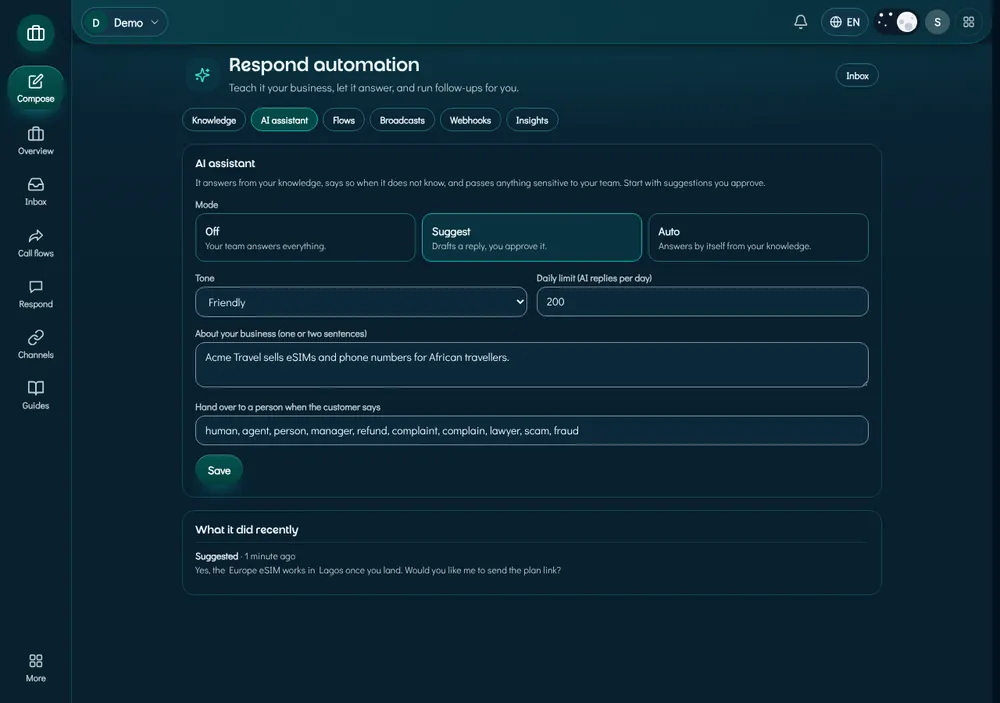
*The AI assistant tab: mode, tone, daily limit and the monthly allowance meter.*
Honest by design
The assistant is told to say it is an AI if asked, to reply in the customer's language, never to invent prices or links, never to promise refunds or discounts, and never to ask for passwords, card numbers or one-time codes. It treats the customer's text as a question, never as orders.
What you can see
The AI assistant tab lists every recent decision: answered, suggested, handed over, refused, or stopped by a limit, with the reason. The cost of each reply is measured in the platform's AI cost log, so a plan's margin is never a guess.
How to roll it out
Start with Suggest for a week. Read what it drafts. Fix the FAQ wherever a draft is wrong. When most drafts are ones you would have sent, try Auto for a single channel.
Questions people ask
**How many FAQs do I need before turning it on?** Three good ones is enough to start in Suggest mode. Add more wherever a draft is wrong or the assistant hands over.
**Can it speak other languages?** It replies in the language the customer wrote in, but it can only use facts from your knowledge, so add key policies in the languages your customers use.
**Does it see my customers' private data?** It reads the conversation and your knowledge. It cannot look up accounts, send money or change anything.
Keep reading
-
 Naara Pro & Business
Broadcast Messages Done Right: Consent, STOP and What Channels Allow
A broadcast can build loyalty or burn your reputation. Here is how Respond handles consent, opt-outs and the r...
2 min read
-
 Naara Pro & Business
Launch Your Own Connectivity Brand: How Naara White Label Works
White Label lets an agency or entrepreneur run the Naara platform under its own name. Here is the path from la...
2 min read
-
 Naara Pro & Business
Set Up Your Naara Business Workspace in Ten Minutes
The Setup Guide walks you through profile, channels, your AI helper and team, one small step at a time, and re...
2 min read
-
 Naara Pro & Business
Naara Respond: One Inbox for Telegram, Web Chat and Email
Respond brings your customers' messages from Telegram, your website chat and email into one inbox, with a know...
3 min read
-
 Naara Pro & Business
The Business Suite Shared Inbox: One Place for Your Whole Team to Answer Customers
Stop forwarding screenshots between teammates. A shared inbox, roles and a clear owner for every conversation...
2 min read
-
 Naara Pro & Business
Naara Pro for Brands: What You Actually Get, Plain and Simple
Naara Pro is one package: a verified brand listing, Naara Chat, handbooks, the Business Suite and perks. Here...
2 min read
Keep reading
-
Naara Pro & Business
Broadcast Messages Done Right: Consent, STOP and What Channels Allow
A broadcast can build loyalty or burn your reputation. Here is how Respond handles consent, opt-outs and the r...
2 min read
-
Naara Pro & Business
Launch Your Own Connectivity Brand: How Naara White Label Works
White Label lets an agency or entrepreneur run the Naara platform under its own name. Here is the path from la...
2 min read
-
Naara Pro & Business
Set Up Your Naara Business Workspace in Ten Minutes
The Setup Guide walks you through profile, channels, your AI helper and team, one small step at a time, and re...
2 min read
-
Naara Pro & Business
Naara Respond: One Inbox for Telegram, Web Chat and Email
Respond brings your customers' messages from Telegram, your website chat and email into one inbox, with a know...
3 min read
-
Naara Pro & Business
The Business Suite Shared Inbox: One Place for Your Whole Team to Answer Customers
Stop forwarding screenshots between teammates. A shared inbox, roles and a clear owner for every conversation...
2 min read
-
Naara Pro & Business
Naara Pro for Brands: What You Actually Get, Plain and Simple
Naara Pro is one package: a verified brand listing, Naara Chat, handbooks, the Business Suite and perks. Here...
2 min read