


Set Up Your Naara Business Workspace in Ten Minutes
October 6, 2026 · Supreme Admin
The Setup Guide walks you through profile, channels, your AI helper and team, one small step at a time, and remembers where you stopped.
Nobody wants a settings maze on a Monday morning. The Business Suite **Setup Guide** is a short, resumable pop-up that takes you from an empty workspace to one that answers customers.
Start it
Open the Business overview and press **Start setup** (it says **Continue setup** once you have begun). A progress bar shows how far you are, and each step shows what it enables before it asks for anything.
The steps, in order
1. **Business profile.** A name customers will recognise, and a business email. We ask you to confirm the email so notices reach a real inbox. 2. **Connect a channel.** Telegram, WhatsApp or Instagram, with plain instructions and a *Test and connect* button that checks your details with the channel before saving them. 3. **Teach and automate (Respond).** Add a FAQ, then choose **Suggest** so the assistant drafts and you approve. Turn on a starter flow if you like. 4. **Team.** Invite colleagues as admin, agent or viewer. You can skip this and come back. 5. **Call flows, recording, AI voice, integrations.** Each appears only if your plan includes it. A locked step tells you what unlocks it.
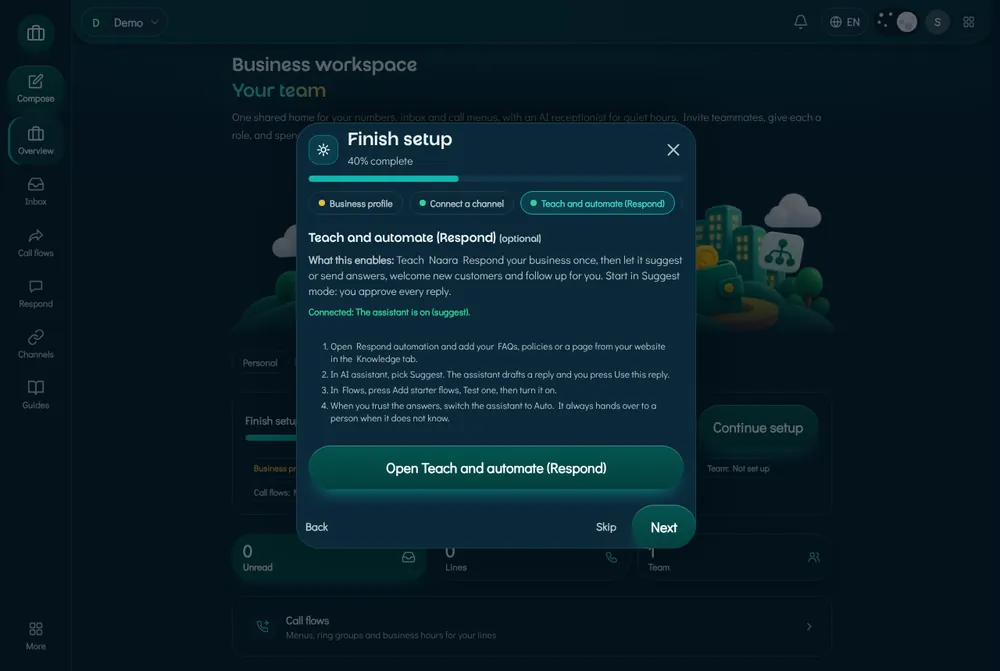
*The Setup Guide shows what a step enables and how to do it.*
What the guide never does
It never shows a step as done because a box was ticked. Each status is read from what is really saved, so the overview and the wizard cannot disagree. Secrets you paste (like a bot token) are encrypted, wiped from the page after connecting and never shown again.
If something goes wrong
Each step explains the likely cause in words and offers a one-click fix where there is one. A channel that needs attention says so on the overview.
Ten-minute plan
- Minutes 0 to 2: name and email.
- Minutes 2 to 5: connect one channel and send a test message.
- Minutes 5 to 8: add three FAQs.
- Minutes 8 to 10: set the assistant to Suggest and answer one real question with it.
Questions people ask
**Can I skip steps?** Yes. Optional steps say so, and you can skip any step and return later. The overview shows what is left.
**Why is a step locked?** Your plan does not include that feature yet. The step says which feature unlocks it.
**Is my business email shown to customers?** It receives workspace notices and builds trust. The name is what customers see.
Keep reading
-
 Naara Pro & Business
Broadcast Messages Done Right: Consent, STOP and What Channels Allow
A broadcast can build loyalty or burn your reputation. Here is how Respond handles consent, opt-outs and the r...
2 min read
-
 Naara Pro & Business
Launch Your Own Connectivity Brand: How Naara White Label Works
White Label lets an agency or entrepreneur run the Naara platform under its own name. Here is the path from la...
2 min read
-
 Naara Pro & Business
AI Replies You Can Trust: Why Respond Only Answers From Your Own FAQ
The risky thing about AI support is a confident wrong answer. Here is how Respond keeps its assistant grounded...
3 min read
-
 Naara Pro & Business
Naara Respond: One Inbox for Telegram, Web Chat and Email
Respond brings your customers' messages from Telegram, your website chat and email into one inbox, with a know...
3 min read
-
 Naara Pro & Business
The Business Suite Shared Inbox: One Place for Your Whole Team to Answer Customers
Stop forwarding screenshots between teammates. A shared inbox, roles and a clear owner for every conversation...
2 min read
-
 Naara Pro & Business
Naara Pro for Brands: What You Actually Get, Plain and Simple
Naara Pro is one package: a verified brand listing, Naara Chat, handbooks, the Business Suite and perks. Here...
2 min read
Keep reading
-
Naara Pro & Business
Broadcast Messages Done Right: Consent, STOP and What Channels Allow
A broadcast can build loyalty or burn your reputation. Here is how Respond handles consent, opt-outs and the r...
2 min read
-
Naara Pro & Business
Launch Your Own Connectivity Brand: How Naara White Label Works
White Label lets an agency or entrepreneur run the Naara platform under its own name. Here is the path from la...
2 min read
-
Naara Pro & Business
AI Replies You Can Trust: Why Respond Only Answers From Your Own FAQ
The risky thing about AI support is a confident wrong answer. Here is how Respond keeps its assistant grounded...
3 min read
-
Naara Pro & Business
Naara Respond: One Inbox for Telegram, Web Chat and Email
Respond brings your customers' messages from Telegram, your website chat and email into one inbox, with a know...
3 min read
-
Naara Pro & Business
The Business Suite Shared Inbox: One Place for Your Whole Team to Answer Customers
Stop forwarding screenshots between teammates. A shared inbox, roles and a clear owner for every conversation...
2 min read
-
Naara Pro & Business
Naara Pro for Brands: What You Actually Get, Plain and Simple
Naara Pro is one package: a verified brand listing, Naara Chat, handbooks, the Business Suite and perks. Here...
2 min read