


Naara Respond: One Inbox for Telegram, Web Chat and Email
October 5, 2026 · Supreme Admin

Respond brings your customers' messages from Telegram, your website chat and email into one inbox, with a knowledge base, an assistant and follow-up flows.
Customers do not pick the channel that is convenient for you. They write where they already are. Naara Respond puts those messages in one inbox so your team does not have to chase them.
Channels that work today
- **Telegram.** Create a bot with BotFather, paste its token in Channels, and messages arrive in Respond.
- **Website chat.** Add the website address you want the chat bubble on, choose a greeting and colour, then paste one line of code into your site.
- **Email.** Forward your support email to the address shown on the card. Replies leave from your own support address.
WhatsApp, Instagram and Messenger follow once Meta's approvals are in place. We would rather say that plainly than promise a date we cannot control.
The inbox
Search, filter by status, and see who is handling what. The thread shows each message with its delivery status. On channels with a 24-hour rule, the composer tells you when the window has closed instead of letting a message fail silently.
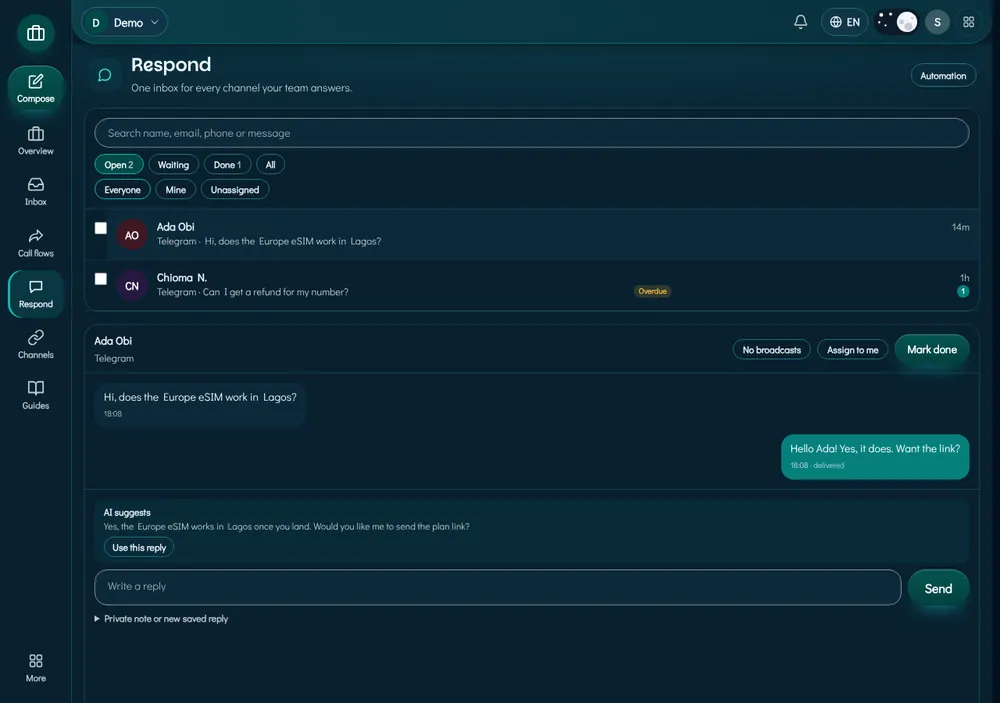
*The Respond inbox: filters, the thread, and an AI suggestion waiting for approval.*
Teach it once
In **Automation > Knowledge** you add FAQs, policies and pages from your website. The assistant answers only from that material.
Let it help, safely
The AI assistant has three modes. **Off** leaves everything to your team. **Suggest** drafts a reply and you press *Use this reply*. **Auto** answers by itself. It hands over to a person if it does not know, if a customer asks for a human or raises a sensitive topic, and if someone tries to change its instructions. It stops at a daily limit and at your plan's monthly allowance.
Flows and broadcasts
Flows react to a first message, a keyword or the time of day. Broadcasts go only to people who agreed to hear from you, and anyone who writes STOP is removed immediately.
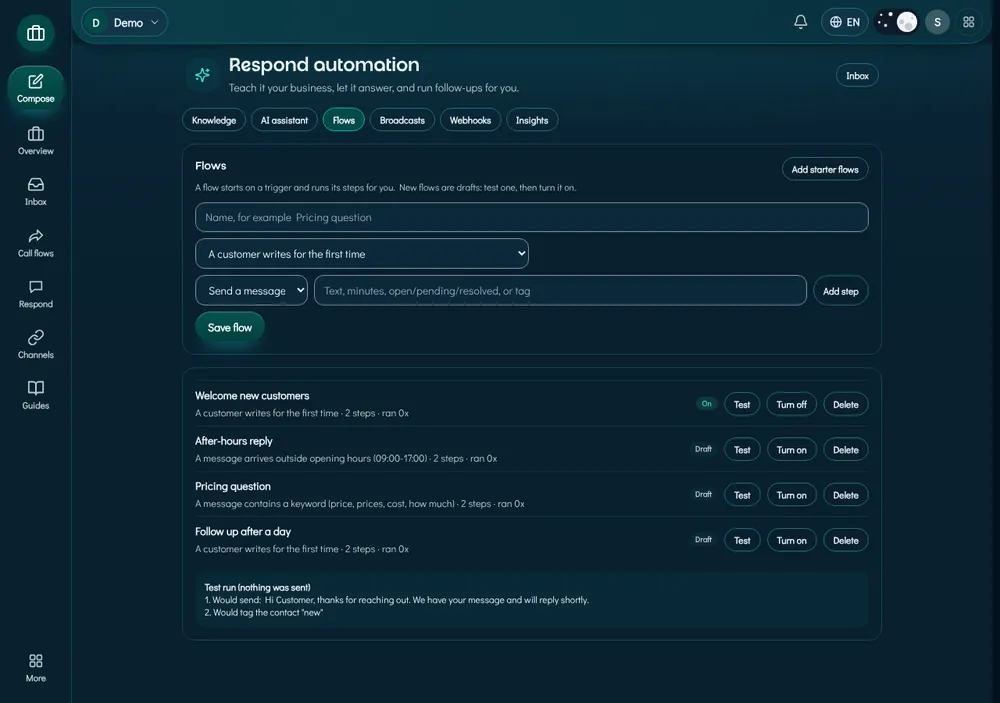
*Test a flow before turning it on: it shows what would happen and sends nothing.*
Know it is working
The **Insights** tab shows how fast you reply, what the assistant handled and whether each channel is healthy, with a plain green, amber or red.
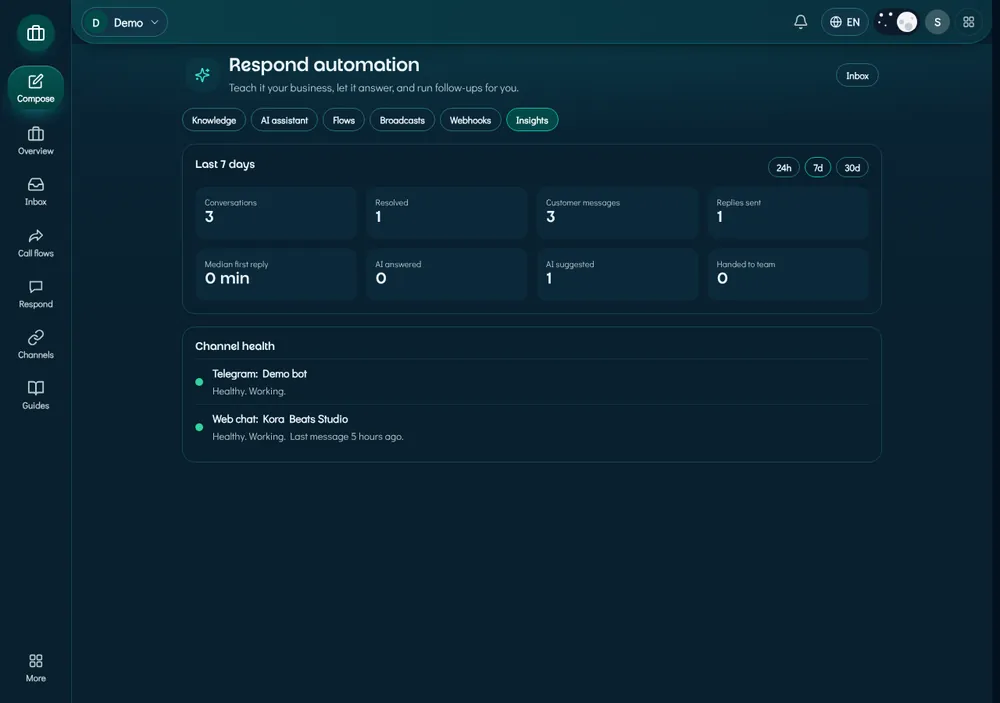
*Insights: response speed, what the assistant handled, and channel health.*
Questions people ask
**Do I need a developer to add website chat?** No. You paste one line of code before the closing body tag. If you use WordPress, add it with any plugin that inserts a header or footer script.
**Can customers see who answered?** They see your business name and greeting. Whether a person or the assistant answered is your choice to show; the assistant says it is an AI if a customer asks.
**What if the queue worker stops?** Messages are stored first and processed after, so nothing is lost. The Insights page turns red and says incoming messages are waiting, and they flow again when the worker returns.
Keep reading
-
 Naara Pro & Business
Broadcast Messages Done Right: Consent, STOP and What Channels Allow
A broadcast can build loyalty or burn your reputation. Here is how Respond handles consent, opt-outs and the r...
2 min read
-
 Naara Pro & Business
Launch Your Own Connectivity Brand: How Naara White Label Works
White Label lets an agency or entrepreneur run the Naara platform under its own name. Here is the path from la...
2 min read
-
 Naara Pro & Business
AI Replies You Can Trust: Why Respond Only Answers From Your Own FAQ
The risky thing about AI support is a confident wrong answer. Here is how Respond keeps its assistant grounded...
3 min read
-
 Naara Pro & Business
Set Up Your Naara Business Workspace in Ten Minutes
The Setup Guide walks you through profile, channels, your AI helper and team, one small step at a time, and re...
2 min read
-
 Naara Pro & Business
The Business Suite Shared Inbox: One Place for Your Whole Team to Answer Customers
Stop forwarding screenshots between teammates. A shared inbox, roles and a clear owner for every conversation...
2 min read
-
 Naara Pro & Business
Naara Pro for Brands: What You Actually Get, Plain and Simple
Naara Pro is one package: a verified brand listing, Naara Chat, handbooks, the Business Suite and perks. Here...
2 min read
Keep reading
-
Naara Pro & Business
Broadcast Messages Done Right: Consent, STOP and What Channels Allow
A broadcast can build loyalty or burn your reputation. Here is how Respond handles consent, opt-outs and the r...
2 min read
-
Naara Pro & Business
Launch Your Own Connectivity Brand: How Naara White Label Works
White Label lets an agency or entrepreneur run the Naara platform under its own name. Here is the path from la...
2 min read
-
Naara Pro & Business
AI Replies You Can Trust: Why Respond Only Answers From Your Own FAQ
The risky thing about AI support is a confident wrong answer. Here is how Respond keeps its assistant grounded...
3 min read
-
Naara Pro & Business
Set Up Your Naara Business Workspace in Ten Minutes
The Setup Guide walks you through profile, channels, your AI helper and team, one small step at a time, and re...
2 min read
-
Naara Pro & Business
The Business Suite Shared Inbox: One Place for Your Whole Team to Answer Customers
Stop forwarding screenshots between teammates. A shared inbox, roles and a clear owner for every conversation...
2 min read
-
Naara Pro & Business
Naara Pro for Brands: What You Actually Get, Plain and Simple
Naara Pro is one package: a verified brand listing, Naara Chat, handbooks, the Business Suite and perks. Here...
2 min read