Theme Builder

Build a mega menu, a mega footer, a header, popups and whole page layouts from designed starting points, then edit every word and picture.

15 minutes BeginnerYour website

Prestige 3 has a Theme Builder. You pick a design from a gallery, press one button, and edit it in Elementor or the block editor. Nothing is locked: every heading, picture and colour is yours.

#1. Open the Theme Builder
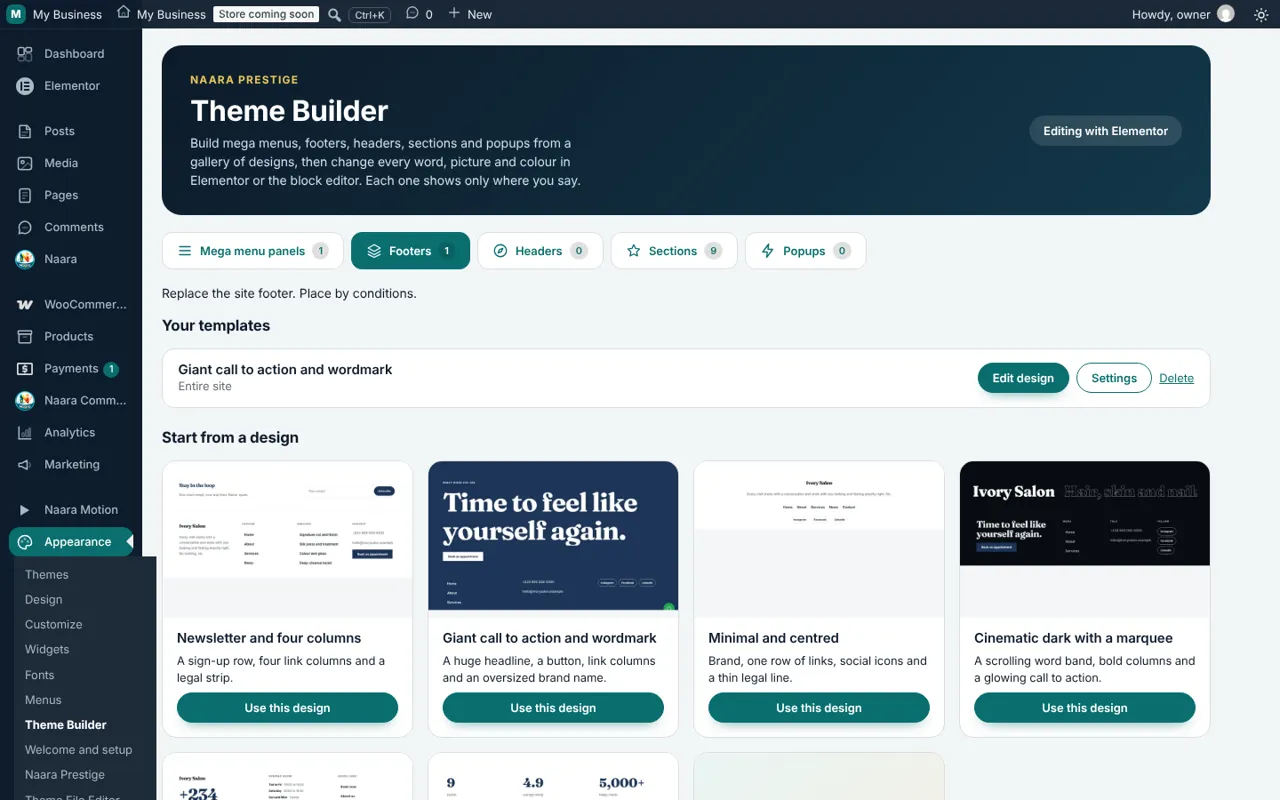
Appearance, Theme Builder. 1: the five tabs, 2: the designs to start from.

In WordPress go to Appearance, Theme Builder. The tabs are Mega menu panels, Footers, Headers, Sections and Popups.

#2. Make a mega menu

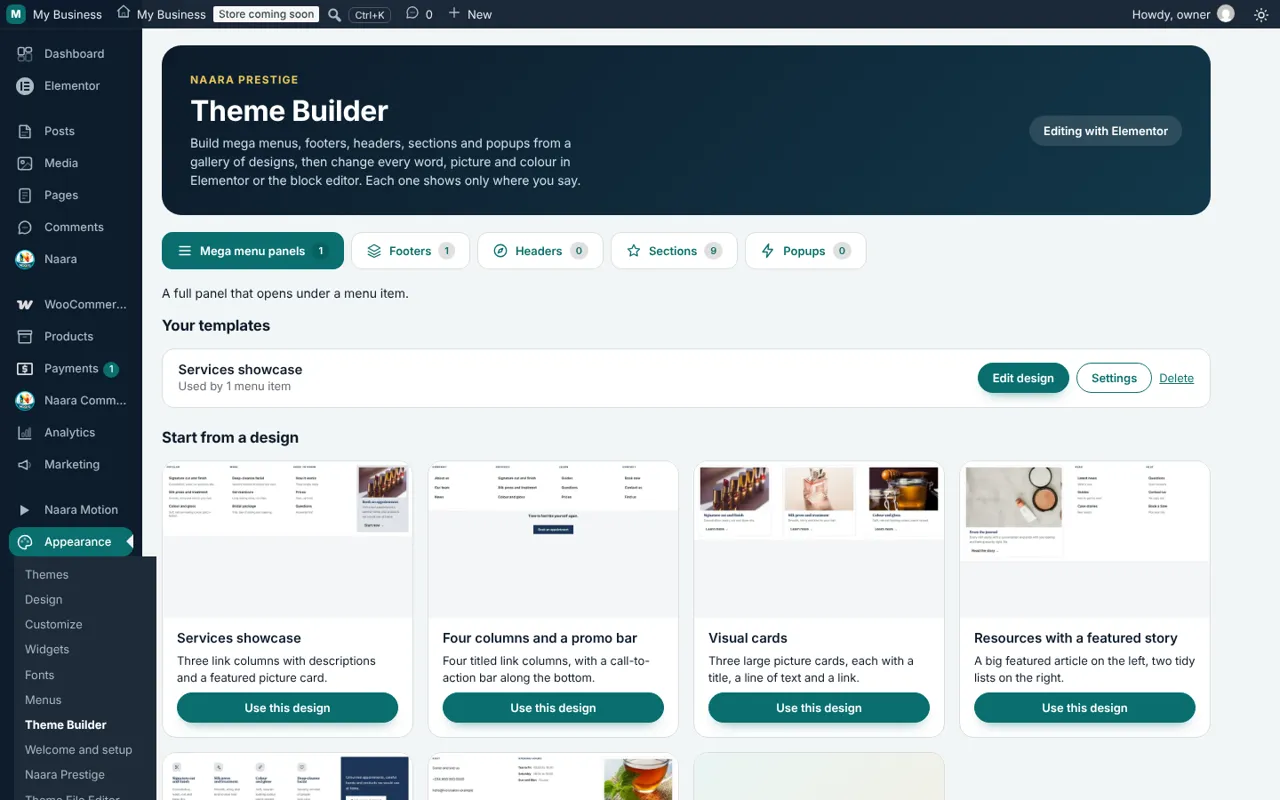
Open Mega menu panels, choose a design (for example Visual cards) and press Use this design. The editor opens with the panel ready to change.
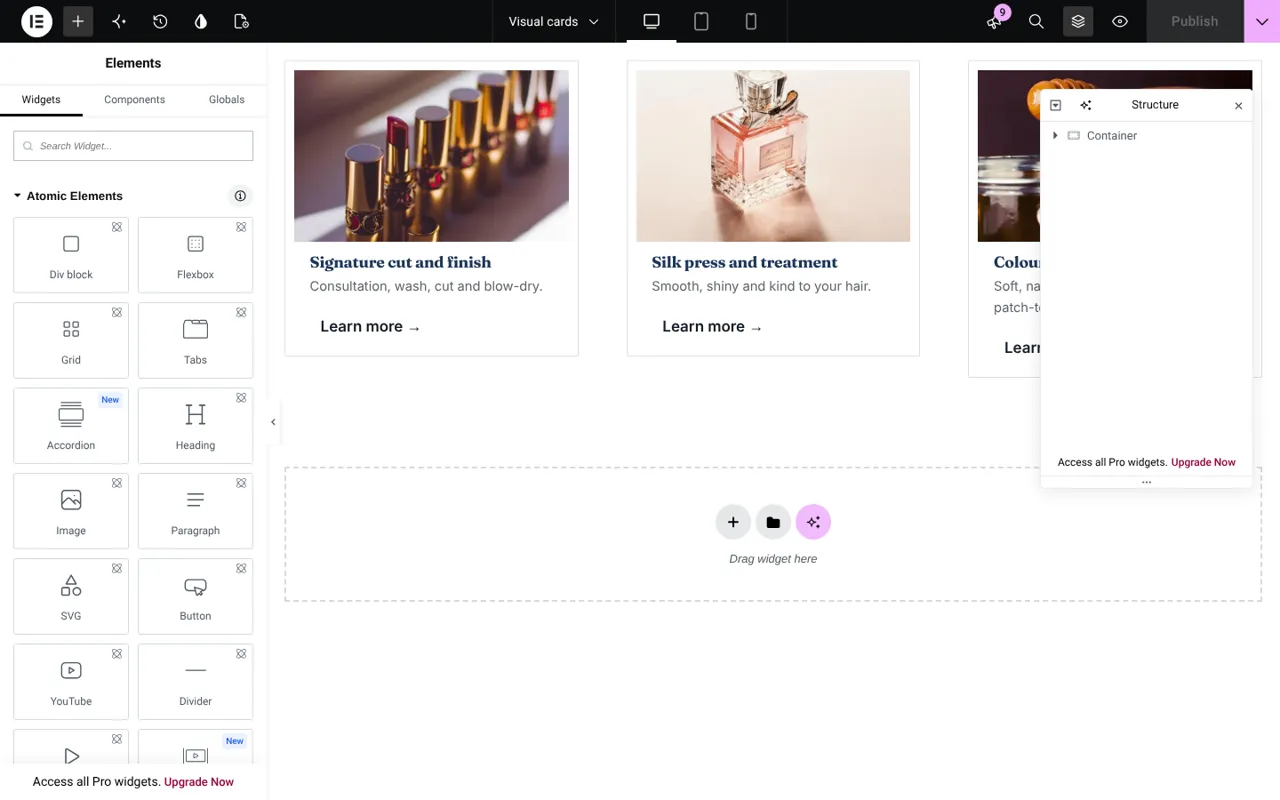
The mega panel open in Elementor. Change any text, picture or button.

Then go to Appearance, Menus, open a top-level item such as Services, and under Mega menu panel (Naara Prestige) choose the panel. Press Save Menu.
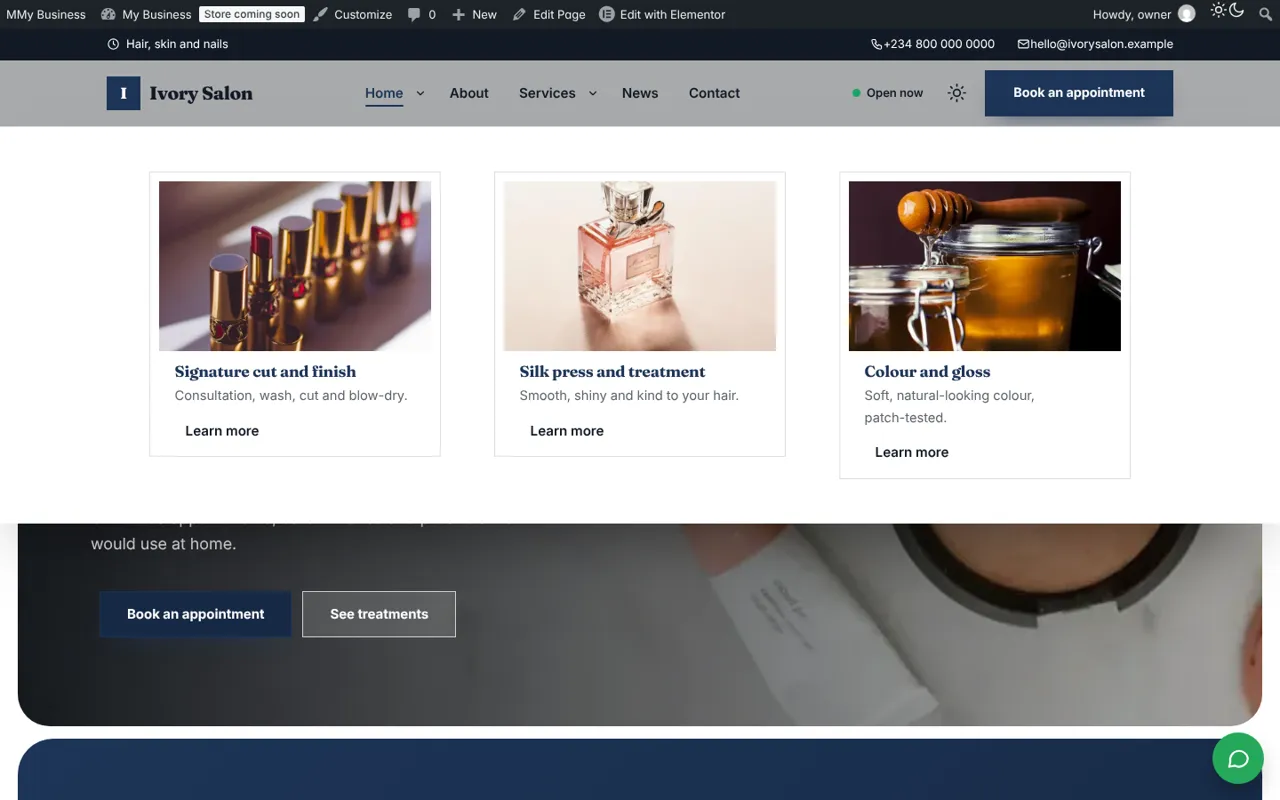
On the live site the panel opens on hover, full width, with a soft page dim.

On a phone the same panel becomes a tidy accordion inside the menu drawer, so nothing is lost.

Footers. Six designs: newsletter, giant call to action, minimal, cinematic dark, contact first and app badges.

Open Footers, choose a design and press Use this design. A new footer replaces the old one on the whole site. In the template's Settings you can show it only on some pages, or hide it on others.

#4. Sections and whole pages
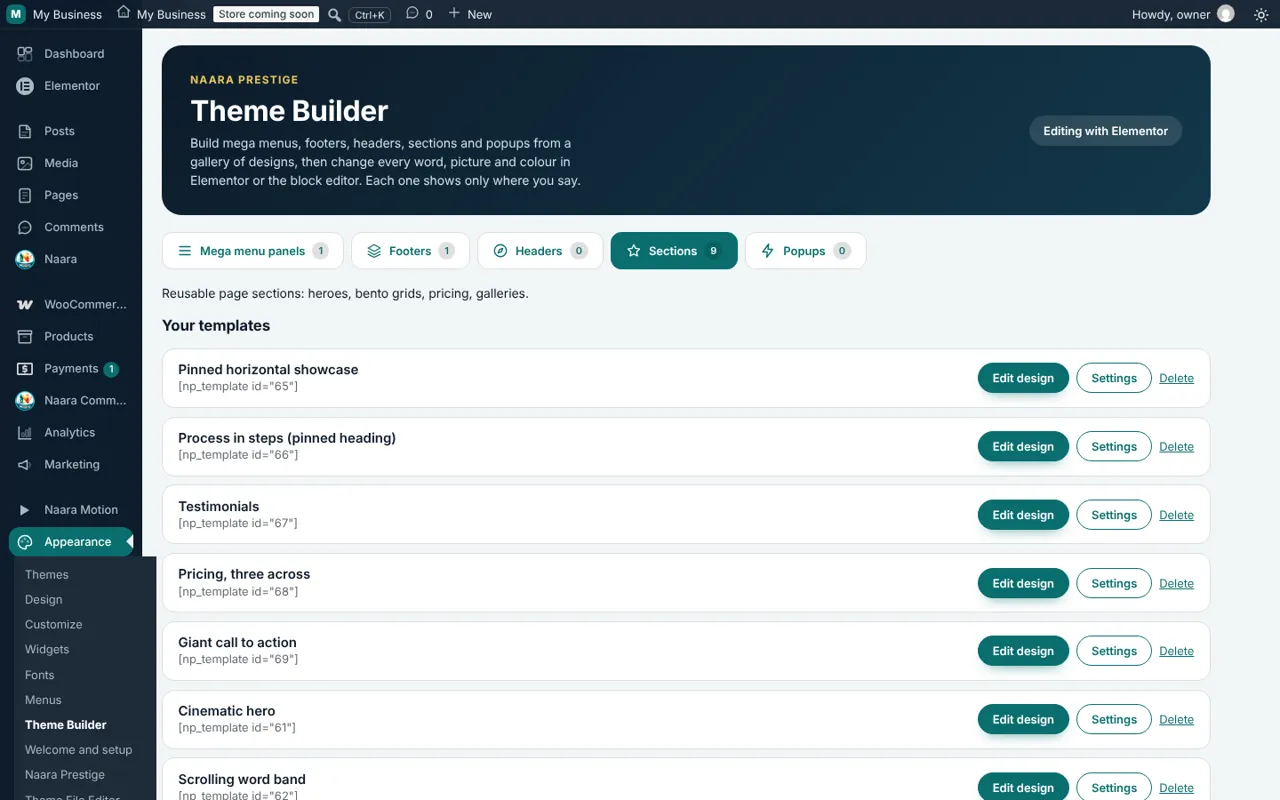
Sections. Cinematic hero, bento grid, pricing, gallery, timeline and more.

Sections are blocks you can drop anywhere with the shortcode shown beside each one, for example [np_template id="65"]. Under the sections you will also find Whole page layouts: press Create this page and you get a draft page made of designed sections, each one editable on its own.

#5. Headers and popups

Headers replace the site header. Popups open on a timer, on scroll, on exit, or when someone clicks a link or button you choose, and can be limited to once a day. Both are created the same way: pick a design, press Use this design, edit.

#If something does not look right

  • A panel does not open: check that you saved the menu after choosing it.
  • Animations do not play: install and switch on Naara Motion.

Stuck? Open the Help Center from your Naara account and start a chat. Tell us the guide name and the step number. Help Center

From the Naara blog

All posts
Naara Pro & Business Broadcast Messages Done Right: Consent, STOP and What Channels Allow A broadcast can build loyalty or burn your reputation. Here is how Respond handles consent, opt-outs and the rules that differ between channels. Oct 16, 2026 Money, Wallet & Pricing Wallet Top-Ups and Gift Cards on Naara: Paying, Withdrawing and Staying in Control One wallet pays for everything. Here is how to top up, which payment methods you can expect, how to withdraw earnings and how gift cards fit in. Oct 15, 2026 Naara Chat & Community Naara Chat Tips: Gestures, Status Updates and Other Things You Might Have Missed A quick tour of the small features that make Naara Chat faster: swipe to reply, status updates with mentions, scheduled messages and more. Oct 14, 2026 NaaraCredits & Loyalty Earn NaaraCredits by Following Brands: How the Rewards Hunt Works Follow a brand's real social pages, earn credits you can spend on chat and calls, and know exactly how it is checked. Oct 13, 2026 Naara Chat & Community Voice and Video Calls on Naara: What Makes a Call Connect (and Why TURN Matters) Calls inside Naara are peer to peer when they can be and relayed when they must be. Here is what that means for call quality and what to check if a call will not connect. Oct 12, 2026 Developers & Integrations Build on Naara: API Keys, Signed Webhooks and Testing Safely How to connect your own tools to Naara: create a key, call the API, receive signed webhooks and verify them properly. Oct 11, 2026 Developers & Integrations Sell eSIMs on Your Own Website With Naara Widgets and the WordPress Plugin Embed a Naara catalogue on your site, let visitors check out on a hosted page, and track every order, with or without writing code. Oct 10, 2026 Naara Pro & Business Launch Your Own Connectivity Brand: How Naara White Label Works White Label lets an agency or entrepreneur run the Naara platform under its own name. Here is the path from landing page to your own live install. Oct 9, 2026 Travel Handbooks The Naara Travel Handbook Store: Long-Form Guides for People Who Move Across Borders Short blog posts cannot cover a visa, a degree or a first lease. The Handbook Store has book-length guides, with a reader that can read aloud. Oct 8, 2026